.png)
.png)
.png)
.png)
.svg)
.svg)
.svg)
.svg)


Online Banking Information
Online Banking Enrollment Instructions
Updated 08/08/2024
- Please access our website at firstfederalbankofohio.bank. Once there, you
will see a blue box in the top right corner that says “Online Banking”. Please
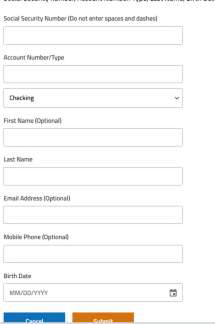
click on the “Enroll Now” option. - The first page that will generate will request your personal information. You
must enter either your mobile number or email address to continue in the
enrollment process.
- Once your information has been successfully validated, you will be directed
to create a User ID and password.- The User Id will need to be unique. If one already exists, you will be
asked to create another one. - Your password must be between 9-32 characters long and must
contain a lowercase letter, an uppercase letter, a number and a
special character.
- The User Id will need to be unique. If one already exists, you will be
- After your credentials have been verified, you will then have to complete
an identity verification. This is a security precaution that allows us to verify
you and keep your accounts safe. Here you can either choose to receive a
text message or phone number. You will be able to choose which number
the verification be sent to if you have multiple listed. Once received, please
enter the code in the appropriate location. - The last step in your enrollment will be to accept the banks Terms and
Conditions. Once complete, your accounts should be visible to you!
For any questions or concerns, please feel free to give the bank a call at 419-468-1518! We would be more than happy to assist!
THE RIGHT LOAN. THE RIGHT BANK.
Locally Owned & Operated since 1891. Experience the difference with First Federal Bank of Ohio. Get started today!